Googlebook OS: Features, Android Integration, Gemini AI, Release and the Future of Google Laptops

Googlebook OS is Google’s new operating system for its next generation of laptops, designed to combine the strengths of Android and ChromeOS in a more connected, intelligent and versatile computing experience. Introduced as part of Google’s Googlebook platform, the operating system represents an important development in the company’s strategy to bring smartphones, tablets and laptops closer together.

For years, Google has maintained two major software platforms for personal computing and mobile devices. Android powers smartphones and tablets, while ChromeOS has provided a lightweight, browser-focused operating system for Chromebooks. Although the two platforms have gradually become more interconnected, their different foundations have created limitations for users who want a consistent experience across devices.
Googlebook OS aims to address this gap by bringing Android’s application ecosystem and modern software capabilities together with the desktop-oriented foundations of ChromeOS. The result is a computing platform designed for everyday productivity, entertainment, creative work and artificial intelligence-assisted tasks.
Table of Contents
The new platform also places Google’s Gemini AI technology at the centre of the user experience. Rather than treating artificial intelligence as a separate application, Google is building a computing environment in which AI can help users organise information, interact with content and complete tasks more efficiently.
Googlebook OS is particularly relevant to Android smartphone owners who want a laptop that works naturally with their existing devices. However, its long-term success will depend on application compatibility, performance, battery efficiency, software updates and the quality of the overall desktop experience.
What Is Googlebook OS?
Googlebook OS is an operating system developed by Google for its Googlebook laptop platform. According to Google’s official announcement, the software brings together Android technology and desktop foundations from ChromeOS to create a more integrated computing experience.
The operating system is intended to support modern laptop workflows without abandoning the simplicity, security and ease of use that have helped Chromebooks become popular in education, business and personal computing.
Unlike traditional desktop operating systems that primarily focus on running desktop applications, Googlebook OS is designed to connect mobile applications, web services, cloud-based productivity tools and AI-powered features within a unified environment.
Its development also reflects the changing role of laptops. Modern users increasingly expect their computers to communicate seamlessly with smartphones, synchronise files automatically, support video calls and productivity applications, and provide intelligent assistance when completing everyday tasks.
Googlebook OS is designed around these expectations.
Googlebook OS and the Googlebook laptop platform
It is important to distinguish between Googlebook and Googlebook OS.
Googlebook is Google’s new category of laptops, developed with hardware partners. Googlebook OS is the software platform that powers these devices.
This distinction is similar to the relationship between a Windows laptop and the Windows operating system or between an iPhone and iOS.
Google has introduced Googlebook as a premium laptop experience built around Android integration, Gemini AI and hardware from established computer manufacturers. The first announced hardware partners include Acer, ASUS, Dell, HP and Lenovo.
The partnership model allows Google to develop the software experience while established manufacturers produce laptops with different designs, display sizes, processors and other hardware configurations.
Consequently, Googlebook OS is not simply a new name for an individual laptop. It is the software foundation intended to connect the Googlebook ecosystem.
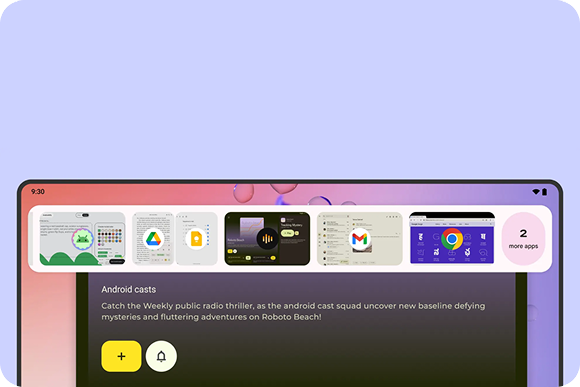
Why Google developed Googlebook OS
Google’s existing platforms have different strengths.
Android offers a vast mobile application ecosystem, established smartphone integration and a software foundation designed for modern mobile hardware. ChromeOS, meanwhile, provides a lightweight desktop environment built around the Chrome browser, web applications, security and straightforward device management.
Bringing these strengths together could make Google’s laptops more useful for people who rely on both mobile and desktop computing.
For example, someone could begin researching a topic on an Android smartphone, continue working on a laptop, access relevant files and notifications, and use Gemini to help organise information. The objective is to reduce the friction associated with switching between separate devices.
Googlebook OS also gives Google an opportunity to improve how Android applications behave on laptops, where larger displays, keyboards, trackpads and multitasking require a different approach from smartphone interfaces.
Googlebook OS vs ChromeOS: What Is the Difference?
ChromeOS has traditionally been designed around the Chrome browser, web applications and cloud-based services. Although it supports Android applications on compatible Chromebooks, the experience has not always been identical to running an application directly within Android.
Googlebook OS represents a more integrated approach, using Android technology alongside the desktop foundations associated with ChromeOS.
The main differences concern application support, device integration, artificial intelligence and the direction of Google’s computing ecosystem.
Android-based software foundation
One of the most important characteristics of Googlebook OS is its Android-based foundation.
Android already supports a broad ecosystem of applications covering communication, entertainment, education, productivity, photography and creative work. Using Android technology more deeply within a laptop operating system could help Google improve the consistency and performance of these applications on larger screens.
It could also make it easier for developers to build applications that work across smartphones, tablets and laptops.
However, an Android-based foundation does not automatically guarantee that every smartphone application will work perfectly on a laptop. Developers still need to consider screen sizes, keyboard and mouse input, window management, processor architecture and other desktop-specific requirements.
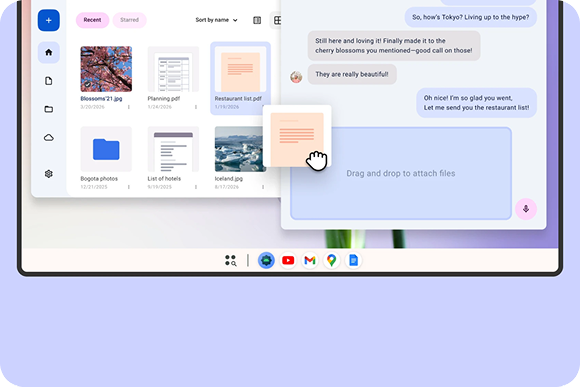
A more complete desktop experience
Googlebook OS is designed for laptops rather than simply presenting a smartphone interface on a larger screen.
A useful desktop operating system must handle multiple windows, file management, external displays, keyboard shortcuts, pointing devices and background tasks efficiently.
Google’s approach combines mobile software capabilities with desktop-oriented elements from ChromeOS. This could provide a more familiar environment for users moving from traditional laptops while preserving access to Android applications.
The quality of this experience will depend on how well Google implements multitasking, application resizing, file access and interaction between different applications.
The continuing role of ChromeOS
The introduction of Googlebook OS does not mean existing Chromebooks will immediately stop working.
Google’s Chrome Enterprise and Education guidance states that current ChromeOS devices will continue to receive updates throughout their supported lifetimes. Google also says that many newer Chromebooks will be eligible for a transition to Googlebook OS, although device eligibility and migration details will be provided separately.
For schools, businesses and other organisations, this is an important distinction. A new consumer laptop platform does not automatically replace the management systems, deployment procedures and software support arrangements already used by institutional customers.
Google has indicated that its commercial management roadmap will develop over several years, with initial core management capabilities planned for the second half of 2027.
Existing Chromebook owners should therefore check Google’s official support information rather than assume their devices will receive an upgrade.
Googlebook OS Features: What Users Can Expect
Googlebook OS combines several major priorities: Android application support, integration with smartphones, desktop productivity and built-in AI capabilities.
The following sections examine the most important features announced for the Googlebook experience.
1. Gemini AI integration
Artificial intelligence is one of the central ideas behind Google’s new laptop platform.
Google is designing Googlebook around Gemini, its family of AI models and services. This approach reflects the company’s broader strategy to make AI assistance available throughout its software ecosystem.
Rather than requiring users to open a separate AI application for every task, the platform is designed to make assistance available in the context of what they are doing.
Depending on the feature and supported application, AI assistance could help users organise information, generate content, interpret material or move more efficiently between tasks.
For students, this could mean receiving help organising research notes. For professionals, it could involve summarising information or drafting documents. Creative users could benefit from help with brainstorming, planning and preparing content.
However, AI-generated information still requires human review. Users should verify important facts, protect confidential information and avoid treating AI suggestions as automatically correct.
The precise capabilities available may also vary by model, region, language, subscription and software version.
2. Magic Pointer
One of the distinctive features highlighted in Google’s Googlebook announcement is Magic Pointer.
Magic Pointer is designed to provide contextual suggestions through Gemini when users interact with content using the laptop’s pointer.
The concept is to make assistance more immediate. Instead of manually copying information into another application or navigating through multiple menus, users can access relevant AI-powered actions in the context of their work.
This could make common workflows more efficient, particularly when working with documents, web content and other supported material.
For example, contextual assistance could help a user understand selected information or identify an appropriate next step. The actual actions available will depend on the supported software and the capabilities Google provides.
Magic Pointer is an announced feature, but its practical usefulness will depend on its accuracy, responsiveness and integration with third-party applications.
3. Customisable AI-powered widgets
Google has also highlighted the ability to create personalised widgets using prompts.
Widgets provide convenient access to information and functions without requiring users to open an entire application. With AI-assisted customisation, users may be able to describe the information they want to see and organise it into a personalised dashboard.
Potential uses include displaying frequently accessed information, organising work-related tools or creating a more convenient starting point for daily activities.
For example, a student might want a dashboard focused on assignments and study resources, while a professional might prefer quick access to work tools and important information.
The broader goal is to make the computer adapt more closely to individual workflows rather than forcing every user into the same arrangement.
The extent of widget functionality, including which data sources and applications are supported, will determine how useful this feature becomes in everyday use.
4. Improved Android smartphone integration
One of Googlebook OS’s most significant goals is to make Android smartphones and laptops work together more naturally.
Smartphones have become central to communication, photography, authentication, messaging and file sharing. Yet switching between a phone and a laptop can still involve unnecessary steps.
Googlebook is designed to reduce that friction through a more integrated device experience.
Google has highlighted features that allow users to access phone files from a laptop, work with phone applications and continue certain activities across devices.
This is particularly useful for Android users who frequently move between mobile and desktop environments.
For example, a user could capture a photograph on a phone and then access the file from a laptop while preparing a presentation. Another user could begin a task on one device and continue it on another when the relevant application supports the feature.
The goal is to make the smartphone and laptop feel like connected parts of one computing environment.
5. Access to Android applications
Application availability has long been an important consideration for ChromeOS.
Although Chromebooks support Android applications, the experience can vary because mobile applications were often designed primarily for touchscreens and smaller displays.
Googlebook OS’s deeper use of Android technology is intended to provide a more integrated application experience.
Users could benefit from access to familiar communication, entertainment, education and productivity applications alongside desktop-oriented web services.
Nevertheless, application compatibility must be assessed individually. Some applications may not support resizable windows, keyboard shortcuts or multitasking particularly well. Others may have restrictions related to hardware, licensing or developer decisions.
Developers will play an important role in making Android applications genuinely useful on laptops.
6. Web applications and the Chrome browser
Android integration does not remove the importance of web applications.
ChromeOS has traditionally been successful because users can complete many tasks directly through a browser without installing large desktop programs.
Googlebook OS continues to draw on ChromeOS’s desktop foundations, preserving the importance of web-based productivity and online services.
This matters because many organisations rely on browser-based systems for document editing, education, communication, customer management and administration.
Web applications can also provide cross-platform access without requiring developers to create separate native applications for every operating system.
A strong combination of web applications and Android applications could give Googlebook OS a broader range of software options than a platform relying exclusively on either approach.
7. File management and cross-device access
File management is another important part of a modern laptop experience.
Users routinely move documents, images, videos and downloads between smartphones, cloud storage and computers. Googlebook aims to make these activities more convenient through its integration with Android devices.
Accessing phone files from a laptop could reduce the need to send documents to oneself through email or messaging applications.
It could also make the laptop more useful for working with photographs, downloaded files and other content created on a smartphone.
The practical experience will depend on supported file types, device permissions, connectivity and the applications involved.
Users should also distinguish between direct device access and cloud synchronisation. These approaches have different requirements for internet connectivity, privacy and storage.
8. Keyboard, mouse and multitasking support
A laptop operating system must support more than mobile applications.
Users expect reliable keyboard shortcuts, accurate trackpad input, external mice, window management and the ability to work with several applications simultaneously.
Googlebook OS is intended to provide a desktop-oriented experience while benefiting from Android’s application ecosystem.
This combination could be particularly useful for productivity applications that require typing, spreadsheets, document editing and research across multiple windows.
However, application developers must ensure that their software responds appropriately to desktop input. A mobile application that works well on a touchscreen may still be inconvenient when operated with a keyboard and trackpad.
The quality of desktop controls will therefore be a major factor in determining whether Googlebook OS becomes a serious alternative to Windows and macOS for productivity.
9. Security and software updates
Security has long been a defining part of the Chromebook experience.
Googlebook OS is intended to retain core principles associated with ChromeOS, including security, simplicity and ease of management.
For ordinary users, security involves protecting personal information, limiting the impact of malicious software, receiving software updates and maintaining control over application permissions.
For schools and businesses, it also includes account management, device policies and the ability to deploy computers across large groups of users.
Google’s established experience with Android and ChromeOS provides a foundation for these requirements, although the effectiveness of the new platform will depend on the security mechanisms and policies implemented in shipping products.
Users should pay attention to the supported update period of an individual laptop, especially when purchasing a device intended to remain in service for several years.
10. A more connected computing ecosystem
Googlebook OS is part of a wider effort to make Google’s devices and services work together.
A connected ecosystem can reduce repetitive tasks and help users maintain continuity between devices.
For instance, a person could use an Android phone for communication, a laptop for writing and research, and cloud services for storing documents. If the applications and services integrate well, these activities can become parts of one workflow rather than separate processes.
Google’s challenge is to deliver these benefits without making the experience unnecessarily dependent on a particular smartphone, account or subscription.
A successful platform should remain practical for users who work offline, use third-party services or prefer applications outside Google’s own ecosystem.
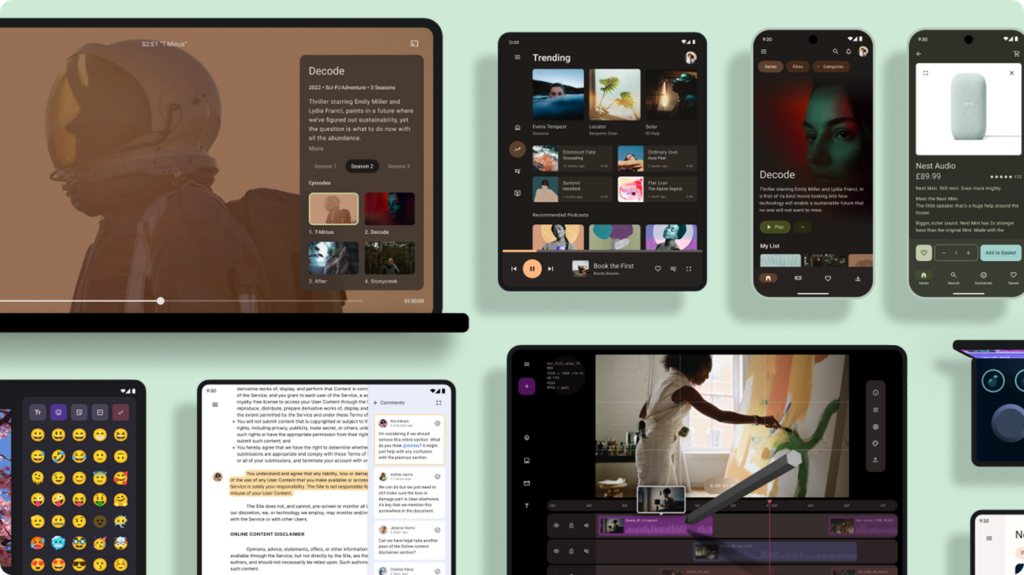
Googlebook OS Performance and Hardware Requirements
An operating system’s capabilities are only part of the overall computing experience. Processor performance, memory, storage, cooling and battery capacity also influence how a laptop performs.
Googlebook OS is being introduced through hardware partners rather than a single fixed laptop configuration.
This means different Googlebook models can offer different combinations of processors, displays, memory and storage.
Processor performance
The processor determines how efficiently a laptop handles applications, multitasking and demanding workloads.
Googlebook devices may use different processor architectures, depending on the manufacturer and model. That can influence application compatibility, power consumption and performance.
The operating system must accommodate this hardware diversity while providing a consistent experience.
Users should compare actual device specifications and independent performance tests rather than assuming that every Googlebook will deliver the same results.
Memory and multitasking
Memory is particularly important when running several applications simultaneously.
A laptop used for web browsing, document editing, video calls and Android applications may benefit from more memory than a device used primarily for simple browsing and streaming.
The ideal configuration depends on the intended workload, application requirements and the operating system’s memory management.
Before purchasing a Googlebook, buyers should review the memory configuration of the exact model rather than relying only on its product name.
Storage capacity
Storage determines how much content can be retained locally.
Users who work with large photographs, videos, offline documents and creative projects may require more storage than people who rely mainly on web applications and cloud services.
Local storage is also relevant when travelling or working without a reliable internet connection.
Buyers should consider whether a laptop offers sufficient built-in storage for their needs and whether its configuration can be upgraded.
Battery life and efficiency
Battery life is a critical factor for a laptop intended for mobile productivity.
Googlebook OS combines Android technology with desktop-oriented computing, but real-world endurance will depend on hardware, screen brightness, background applications, connectivity and workload.
AI processing can also affect power consumption, particularly when intensive tasks run locally.
Claims about battery life should be compared with independent tests that use consistent brightness levels and workloads.
Offline functionality
Cloud-based computing is convenient, but users cannot always rely on a stable internet connection.
A useful laptop should allow supported applications to operate offline, preserve local files and synchronise changes when connectivity returns.
Googlebook OS’s practical offline capabilities will depend on individual applications and the way they store data.
Users who frequently travel, study in areas with limited connectivity or work outside reliable network coverage should verify offline support before buying a device.
Googlebook OS vs Android, ChromeOS, Windows and macOS
Googlebook OS enters a competitive market in which each operating system has different strengths.
Android remains a major platform for smartphones and tablets. ChromeOS is established in education and cloud-focused computing. Windows supports a wide range of desktop software and hardware, while macOS is closely integrated with Apple’s computers and services.
Googlebook OS aims to occupy a position between mobile and traditional desktop computing.
Googlebook OS vs Android
Android is primarily associated with smartphones and tablets, although it supports increasingly sophisticated large-screen and multitasking features.
Googlebook OS builds on Android technology but is intended to deliver a more complete laptop experience.
The key difference is the emphasis on desktop workflows, ChromeOS-derived foundations and integration with laptop hardware.
Googlebook OS should therefore not be understood simply as a smartphone interface displayed on a larger screen.
Googlebook OS vs ChromeOS
ChromeOS focuses on web-based computing, simplicity and manageable devices.
Googlebook OS builds on that desktop heritage while introducing a deeper Android foundation and a stronger emphasis on integrated mobile applications and AI.
Existing Chromebooks remain important because they serve users who prioritise affordability, simplicity and established education or business deployments.
Google’s longer-term strategy for ChromeOS and the migration of eligible devices will be important to monitor.
Googlebook OS vs Windows
Windows offers extensive support for desktop applications, PC gaming, enterprise software and a wide variety of hardware.
Googlebook OS may appeal to users who prefer Android applications, web services and a more tightly integrated Google experience.
However, people who depend on specialised Windows software should not assume that it will run natively on Googlebook OS.
Professional applications, certain development tools, specialised peripherals and some games may remain advantages for Windows computers.
Googlebook OS vs macOS
macOS benefits from integration with Apple’s hardware and services, as well as a mature desktop software ecosystem.
Googlebook OS takes a different approach by focusing on Android integration, Google services and Gemini-powered features.
For Android smartphone owners, Googlebook may provide a more natural connection to their existing devices. For users who already rely on an iPhone, iPad and Mac, Apple’s ecosystem may remain more convenient.
The better option depends on software requirements, hardware preferences, budget and the devices a person already owns.
Who Should Use Googlebook OS?
Googlebook OS could appeal to several groups of users.
Android smartphone owners
People who use Android smartphones may benefit from easier file access, application integration and continuity between devices.
This is one of the platform’s clearest potential advantages.
Students and educators
Students often need a laptop for research, online learning, document editing, communication and collaboration.
Googlebook OS could be useful if it combines the simplicity associated with Chromebooks with better mobile application support.
Schools will also need to consider device management, long-term updates, pricing and compatibility with their existing systems.
Office workers and professionals
People who primarily use browsers, productivity applications, messaging services and cloud storage may find Googlebook OS suitable for everyday work.
Its usefulness for specialised professional workloads will depend on application availability and performance.
Content creators
Writers, bloggers and some creators may benefit from access to productivity tools, Android applications and AI assistance.
However, professional video editing, advanced audio production, complex design software and other demanding creative tasks require careful compatibility and performance testing.
Anyone planning to use a Googlebook for professional motion design or other resource-intensive creative work should confirm that their essential applications and peripherals are supported.
Casual users and families
Users who mainly browse the internet, stream media, communicate and manage personal documents may appreciate a straightforward computing experience.
The value proposition will depend on the final device prices, software support and whether the laptop offers enough functionality without unnecessary complexity.
Googlebook OS Release Date and Availability
Google officially introduced Googlebook in May 2026 and opened pre-orders for the first devices in September 2026. Google’s announcement identifies Acer, ASUS, Dell, HP and Lenovo as hardware partners.
The operating system is therefore no longer merely a rumoured project. Google has announced the Googlebook platform and described Googlebook OS as the software that combines Android and ChromeOS technologies.
Nevertheless, the availability of individual models will vary by manufacturer and market.
Customers should check official product listings and local retailers for confirmed shipping dates, configurations, warranty coverage and regional availability.
Googlebook OS Pricing and Availability in Asia, Europe and America
Googlebook OS is software supplied as part of Googlebook laptops, so buyers generally need to compare the prices of complete devices rather than look for a standalone operating system purchase.
Pricing depends on the laptop manufacturer, processor, memory, storage, display and local taxes.
Asia
Availability in Asia will depend on the country and manufacturer. A product announcement does not guarantee immediate retail availability in every Asian market.
Buyers should check local listings for the specific laptop configuration, warranty terms and supported keyboard layout. Importing a laptop may introduce additional shipping costs, taxes and warranty complications.
In markets such as Tanzania, consumers should verify whether an authorised local seller carries the product or whether the available devices are imported.
Europe
European customers should check the official regional product listings of Google and participating laptop manufacturers.
Final retail prices may differ from US prices because of VAT, regional pricing policies, configuration differences and retailer promotions.
Customers should also confirm the availability of local keyboard layouts, warranty support and any country-specific AI features.
America
The United States is among the markets highlighted in Google’s initial launch coverage, but availability and prices still need to be checked against the exact model.
Buyers should compare configurations carefully because a lower starting price may correspond to different hardware than a more expensive model.
What is the price of Googlebook OS?
There is no separate universal retail price for Googlebook OS that buyers should use when comparing these laptops. The relevant cost is the price of the Googlebook device itself.
For the latest confirmed device prices, use Google’s official Googlebook announcement and the relevant manufacturer’s product listing.
Avoid assuming that a price quoted for one country applies worldwide.
Advantages of Googlebook OS
Googlebook OS has several potential advantages that could make it attractive to consumers.
Better Android integration: A more direct relationship between phones and laptops could simplify file sharing and cross-device workflows.
Broader application opportunities: Its Android foundation could improve access to mobile applications on laptops, provided developers optimise their software.
AI-assisted productivity: Gemini features could help users organise information and complete supported tasks more efficiently.
A familiar desktop environment: ChromeOS-derived foundations could help preserve straightforward laptop use, browser support and established security principles.
Hardware choice: Multiple manufacturers can produce devices for different preferences and use cases.
Potential for ecosystem growth: A unified approach to mobile and desktop computing could encourage developers to improve applications for larger screens.
These advantages are promising, but their value will depend on the actual performance and maturity of the shipping platform.
Challenges and Limitations of Googlebook OS
Despite its potential, Googlebook OS faces several challenges.
Application optimisation
Android applications are not all designed for desktop use. Developers may need to improve window resizing, keyboard navigation, mouse interaction and multitasking.
Without those improvements, some applications may feel like enlarged phone apps rather than full laptop software.
Competition from established operating systems
Windows and macOS already have mature desktop application ecosystems. Users who rely on specialised software may be reluctant to switch unless Googlebook offers suitable alternatives.
Hardware consistency
Different processors and hardware configurations can produce different performance and compatibility results.
Google and its hardware partners must ensure that users receive a consistent experience across supported models.
Dependence on online services
Some features may require an internet connection, cloud services or an eligible account.
Users should understand which applications work offline and which features depend on cloud processing.
AI privacy and accuracy
AI-powered tools can introduce questions about data handling, permissions and the reliability of generated content.
Google will need to communicate clearly about how information is processed and give users appropriate controls over sensitive data.
The transition from ChromeOS
Existing Chromebook owners may wonder whether their devices can move to Googlebook OS.
Google has stated that ChromeOS devices will continue to receive updates for their supported lifetimes and that many newer models will be eligible for a transition. However, eligibility and migration arrangements should be confirmed through official documentation.
This gradual transition will be particularly important for schools and organisations that depend on long-term device support.
The Future of Googlebook OS
Googlebook OS could become an important part of Google’s computing strategy if it successfully combines the strengths of Android and ChromeOS.
The company already operates a large ecosystem of mobile applications, cloud services, web technologies and AI tools. A laptop operating system that connects these resources more naturally could make Google’s services more useful throughout the day.
The biggest opportunity lies in continuity between devices. Users increasingly move between smartphones, tablets and computers, and they expect their applications and information to follow them.
A laptop that makes this process straightforward could be valuable even without replacing every traditional desktop application.
AI is another important part of the platform’s future. As Gemini becomes more deeply integrated into everyday computing, Googlebook OS could offer assistance that is more context-aware and accessible than a conventional standalone chatbot.
However, the operating system’s long-term success will depend on practical execution. Application developers must support desktop workflows, hardware manufacturers must deliver reliable devices, and Google must maintain strong security, update policies and a consistent user experience.
Googlebook OS will also need to demonstrate that its AI features provide genuine benefits rather than simply adding complexity to familiar tasks.
Frequently Asked Questions About Googlebook OS
What is Googlebook OS?
Googlebook OS is Google’s operating system for its Googlebook laptop platform. It combines Android technology with desktop foundations from ChromeOS and is designed around application support, smartphone integration and Gemini AI.
Is Googlebook OS officially announced?
Yes. Google has officially announced Googlebook and described Googlebook OS in its Chrome Enterprise and Education documentation. It is no longer accurate to describe the entire platform as an unconfirmed rumour.
Is Googlebook OS the same as Android?
No. Googlebook OS uses Android technology but is designed for laptop computing, incorporating desktop-oriented elements from ChromeOS.
Is Googlebook OS replacing ChromeOS?
Google is introducing Googlebook OS for its new Googlebook platform, but existing ChromeOS devices will continue to receive updates throughout their supported lifetimes. The company has also indicated that many newer Chromebooks may be eligible for a transition. The full migration path remains dependent on official eligibility details.
Can Googlebook OS run Android applications?
Android application support is a central part of the platform’s design. However, compatibility and usability can vary by application, hardware configuration and developer optimisation.
Does Googlebook OS include Gemini AI?
Google has designed Googlebook around Gemini intelligence and announced features including Magic Pointer and prompt-created widgets. Specific capabilities may vary depending on software version, account, region and supported applications.
Will Googlebook OS work offline?
Some applications and functions may work offline, but others require internet access or cloud services. Users should verify offline capabilities for the applications they depend on.
Can existing Chromebooks upgrade to Googlebook OS?
Google has said that many newer Chromebooks will be eligible for a transition, but not every Chromebook is guaranteed to qualify. Owners should consult Google’s official support documentation for updates on eligibility.
Is Googlebook OS available in Tanzania?
Availability depends on local distribution and the particular Googlebook model. Tanzanian buyers should check official manufacturer listings and authorised retailers before purchasing or importing a device.
How much does Googlebook OS cost?
Googlebook OS is supplied as part of a Googlebook laptop. There is no single universal standalone price for the operating system; buyers should compare the price of the complete device and its specifications.
Is Googlebook OS better than Windows?
Neither platform is automatically better for everyone. Googlebook OS may suit Android users and people who rely on web applications, while Windows may be more suitable for users who need specialised desktop software, particular peripherals or a broader selection of PC games.
Is Googlebook OS suitable for students?
It could be suitable for students who need web browsing, document editing, online learning and communication. Schools should evaluate application compatibility, management tools, hardware prices and long-term support before adopting the platform.
Conclusion
Googlebook OS marks a significant development in Google’s approach to laptop computing. By combining Android technology with ChromeOS’s desktop foundations, Google aims to create a more connected platform that brings mobile applications, web services and Gemini AI into one computing experience.
Its emphasis on smartphone integration could be especially attractive to Android users, while AI-assisted features such as Magic Pointer and customisable widgets offer new ways to interact with a computer.
However, the platform’s success will depend on more than its headline features. Application optimisation, hardware performance, battery life, offline functionality, privacy and long-term software support will all influence its value to consumers.
For existing Chromebook owners, the immediate priority is to understand the continued support of their current devices and wait for confirmed migration guidance. For prospective buyers, the best approach is to compare actual Googlebook models, check application compatibility and verify local availability before making a purchase.
If Google can deliver a polished desktop experience while preserving the simplicity and security associated with ChromeOS, Googlebook OS could become an important option for users seeking a closer connection between their Android phones and laptops.
Sources and References
- Google: Introducing Googlebook, designed for Gemini Intelligence
- Google: Googlebook pre-orders and product information
- Google Chrome Enterprise and Education: What the Googlebook announcement means for ChromeOS devices
- PCWorld: Google’s new Googlebook OS and its Android-based laptop strategy
- 9to5Google: Google’s earlier Aluminium OS development reports